Payout configuration
Choose where Moonbase sends your money; pick a default account, and learn how to reset things if you need to change banks.
Written By Tobias Lønnerød Madsen
This page is where you tell Moonbase how to pay you. You configure a payout account that all proceeds settle into. For more information about the payout process, read our article on Getting Paid.
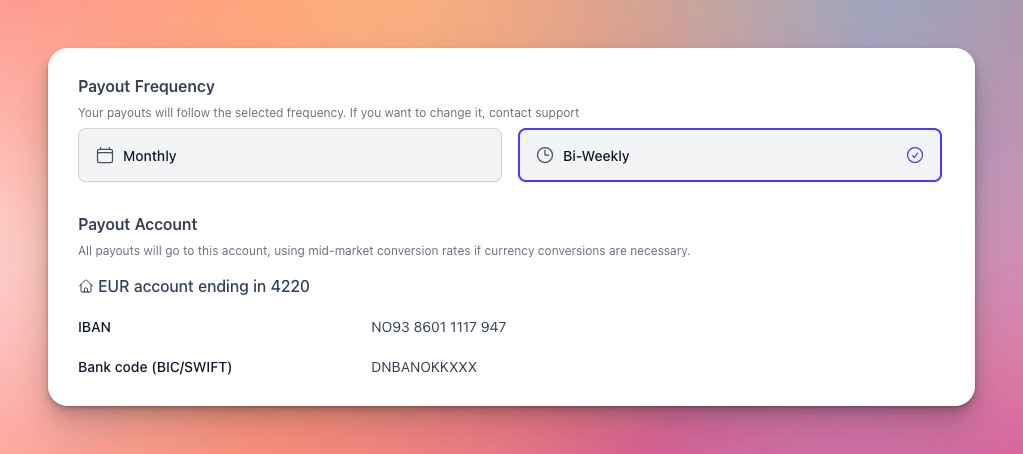
Payout frequency
Payouts run on a fixed schedule. Please contact support if you need to switch from monthly to bi-weekly.
Payout account
Your default payout account receives every payout. All sales settles in a different currency are converted to your account currency at the mid-market rate before being sent. Read more about our currency support in our article on Currencies.
New accounts are set up through Wise (our payout partner). Click Set up account and follow the in-app flow to register your bank details. The flow asks for whatever fields Wise requires for your country and currency — these vary, so the form may look different for you.
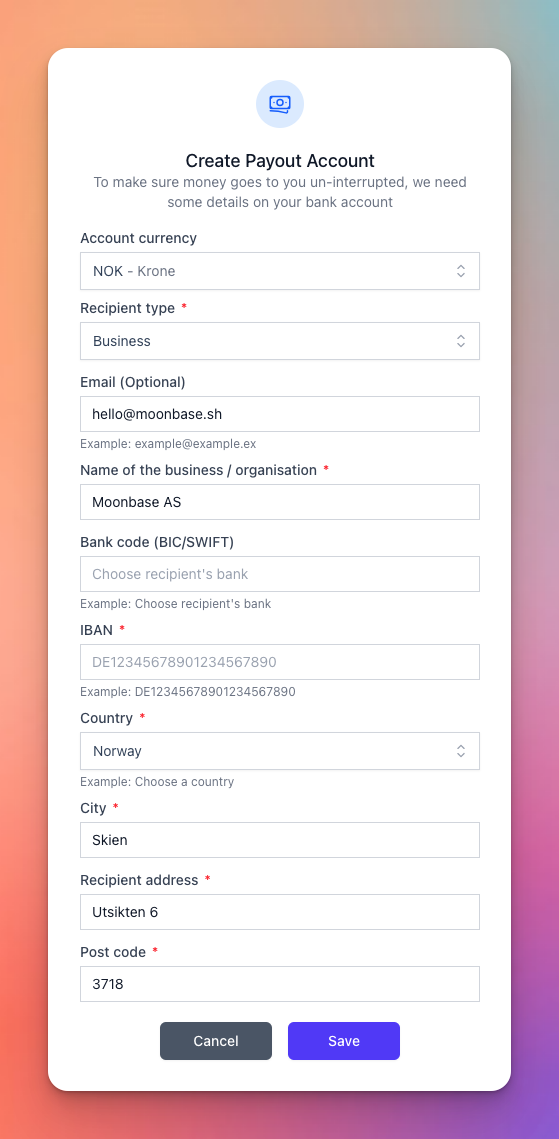
Note: your business address must be filled in (on the Account Information form) before you can set up a payout account.
Resetting a payout account
If you need to change banks or correct a mistake, the account owner (the user who created the Moonbase account) can click Reset payout account. This clears the configuration so a new account can be set up. Only the owner sees this button, and only when an account is currently configured.
Frequently Asked Questions
Why can't I edit the form?
Why can't I edit the form?
To update your payout account, you must reset your account details entirely to enter new account details. This can only by done by the account owner, after a email confirmation.
What FX rate do you use?
What FX rate do you use?
Mid-market - the same rate Wise quotes, with no markup from Moonbase.
Was this helpful?
Still need help? Ask the team