Customer migration
Bring customers across from another platform without making them sign up again — Moonbase calls your endpoints to discover customer records and verify passwords on first login.
Written By Tobias Lønnerød Madsen
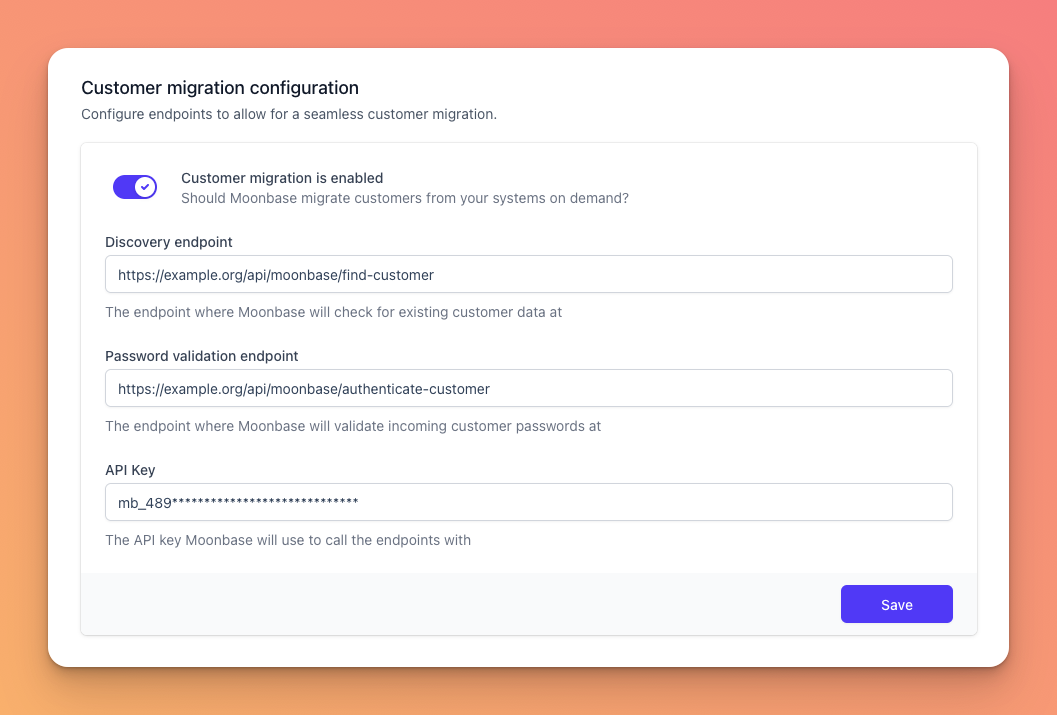
Customer migration lets Moonbase pull customer accounts from another system on demand. The first time a customer logs in or signs up with an email Moonbase doesn't recognise, we call your endpoints to find the existing record and verify the password. If both succeed, we create a Moonbase customer with the same details and the customer continues without noticing the cutover.
When does migration trigger?
On every customer login or sign-up where the email is unknown to Moonbase. Customers who have already been migrated are stored locally and never round-trip to your endpoints again, so the load on your endpoints decays over time.
What you need to provide
Discovery endpoint — a URL Moonbase calls to look up a customer by email.
Password validation endpoint — a URL Moonbase calls to verify a candidate password against your existing system.
API key — a shared secret Moonbase sends in every request so your backend can authorise the call.
Endpoint contracts
All requests going to these endpoints will include an api-key header with the configured API key, which you should validate.
Discovery endpoint
To prevent duplicate accounts, you need to provide a GET endpoint, that will take a email query parameter, and responds with either a HTTP 204/404 if no account with that email exists, or if the account exists, responds with a HTTP 200 and a JSON body like:
{
 "name": "Full customer name",
 "externalId": "Optional ID from your system",
 "address": {
 "countryCode": "NO",
 "streetAddress1": "Slottsplassen 1",
 "streetAddress2": null,
 "locality": null,
 "region": "Oslo",
 "postCode": "0010"
 }
}
The only necessary body parameter is the name , the rest can be omitted if you don’t have it. This endpoint is mainly used to validate that an email is not already associated with an account.
Password validation endpoint
When customers try to sign in the for the time, they will try to use their password. If that password is not yet stored on their Moonbase customer profile, we will try to validate it on your API, and if correct we add it to the account for later sign-ins. For this, you need to provide a POST endpoint, that handles a JSON body with the following payload:
{
 "email": "tobias@moonbase.sh",
 "password": "ExamplePassword"
}
Your endpoint should respond with either a HTTP 200 if the password is correct, or a HTTP 401 if it is not correct. Based on this response, Moonbase will handle the rest of the flow, either signing the customer in, or rejecting their attempt.
Disabling migration
Toggle Customer migration is enabled off and save. Already-migrated customers stay in Moonbase; only new lookups stop happening.
Common questions
Is the password sent in plaintext? Yes — over HTTPS. The password is what the customer just typed; you compare against your stored hash on your side and return 200 or 401. Always use HTTPS endpoints.
What if my system has the customer but no password (e.g. SSO-only)? Always return 401 from the password endpoint. The customer will be prompted to set a Moonbase password, and the discovery data still pre-fills name/address.
Can I rotate the API key? Yes — update the value in this form and save. Moonbase uses the new key immediately. Make sure your backend accepts both old and new for a short overlap if you can't switch atomically.
Was this helpful?
Still need help? Ask the team