Emails your customers receive
Which emails Moonbase sends your customers for you, how to brand them and add your own footer links, sending from your own domain, and what happens when an address bounces
Written By Tobias Lønnerød Madsen
Every time a customer buys from you, signs up or gets a license, Moonbase emails them for you. You don't have to write or send any of these emails, but you decide how they look and which address they come from. Here is what your customers get, what you can change, and what happens when an email can't be delivered.
Which emails Moonbase sends
Moonbase sends these on your behalf, with your name on them:
Purchases: the order receipt with its PDF invoice, refund confirmations, and a corrected receipt when you add business details to an order and the tax is refunded.
Licenses: licenses you grant a customer, and a note when a license that took a while to deliver is ready.
Subscriptions: a receipt for every renewal, a notice when a renewal payment fails, a notice when you upgrade a subscription, and a note when a customer reaches a milestone.
Accounts: an invitation to set up their customer account, email confirmations, password resets, confirming a new email address, and the newsletter confirmation if you use double opt-in.
Marketing: your Email campaigns and Automations, if you use them.
Until your account is live, receipts have "[Test]" at the start of the subject.
The wording of these emails is set by Moonbase, and they can't be switched off for your whole account. Orders you import never send emails, and an order your developer creates through the API can be marked to send none. Moonbase doesn't send renewal reminders, card-expiry warnings, cancellation or expiry confirmations, or trial emails. If you'd like to send some of those yourself, use Automations or an email tool you have connected.
Need a receipt again? Open the sale and use Download receipt, or Resend receipt to email it to the customer once more.
Making them look like yours
Every email to your customers carries your branding:
your logo or wordmark and your account name, from Account settings > Account > Branding;
your brand colour and style, from Account settings > Storefront > Theme (see Theme);
your email address as the reply-to, from Account settings > Account, so customers who reply reach you.
Your links in the footer
Under Account settings > Email > Email footer, you can add your own links to the bottom of every email your customers get from you: receipts, license and account emails, campaigns and automations.
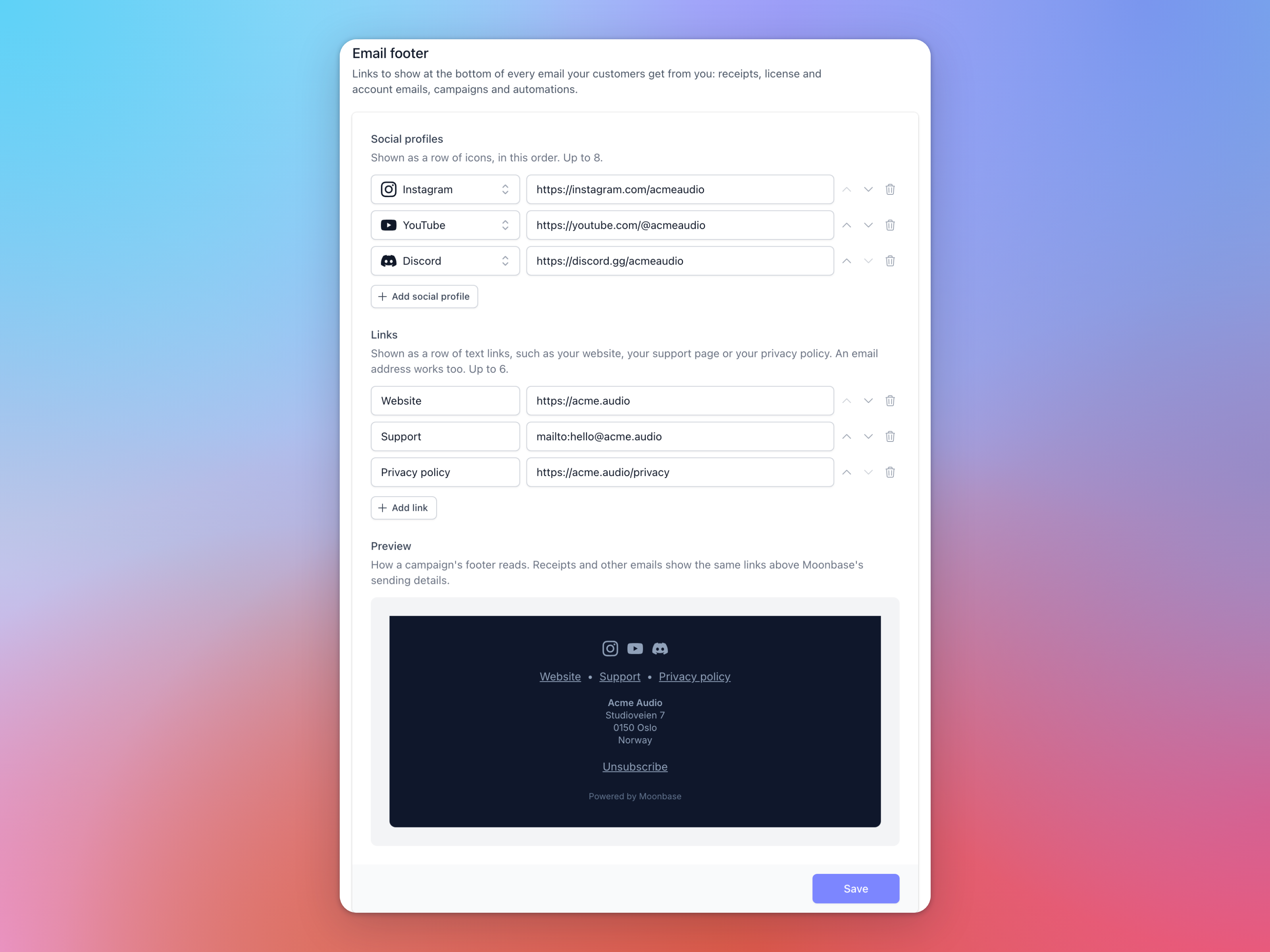
Social profiles: click Add social profile, pick the network and paste the address of your profile. They're shown as a row of icons, in the order you list them, and you can add up to 8.
Links: click Add link and give it a label and an address, like your website, a support page or your privacy policy. An email address works too. You can add up to 6.
Use the arrows to change the order. Preview shows how a campaign's footer will look before you Save. The rest of the footer is added by Moonbase: on campaigns, your account name, your postal address and an unsubscribe link, and on other emails, a line saying who the email was sent to on your behalf.
Sending from your own domain
Until you set up a sending domain, your customers' emails come from no-reply@moonbase.sh, with your account name as the sender. That works, but the address is shared, so your emails are more likely to land in spam. With your own domain, they come from an address like hello@mail.yourbrand.com.
Custom email sending domains and addresses walks you through it: add the domain, publish its DNS records, and once it's verified, add a sending address with the Transactional purpose. That last step matters, because a verified domain on its own changes nothing until there's an address to send from. Campaigns and automations need a sending address with the Marketing purpose.
If an email can't be sent from your own address, for example because the domain's DNS records changed, receipts and other transactional emails go out from no-reply@moonbase.sh instead, so your customers still get them. Marketing emails never fall back.
Emails about your Moonbase account itself, like sale alerts, payouts and verification, always come from Moonbase, whatever domain you set up. You choose who gets them in Email notifications.
When an email bounces
When an email to a customer can't be delivered, Moonbase may block the address, so your account stops sending to it. A blocked address gets no emails from you at all, not even receipts. The customer's page shows Email blocked, with the reason:
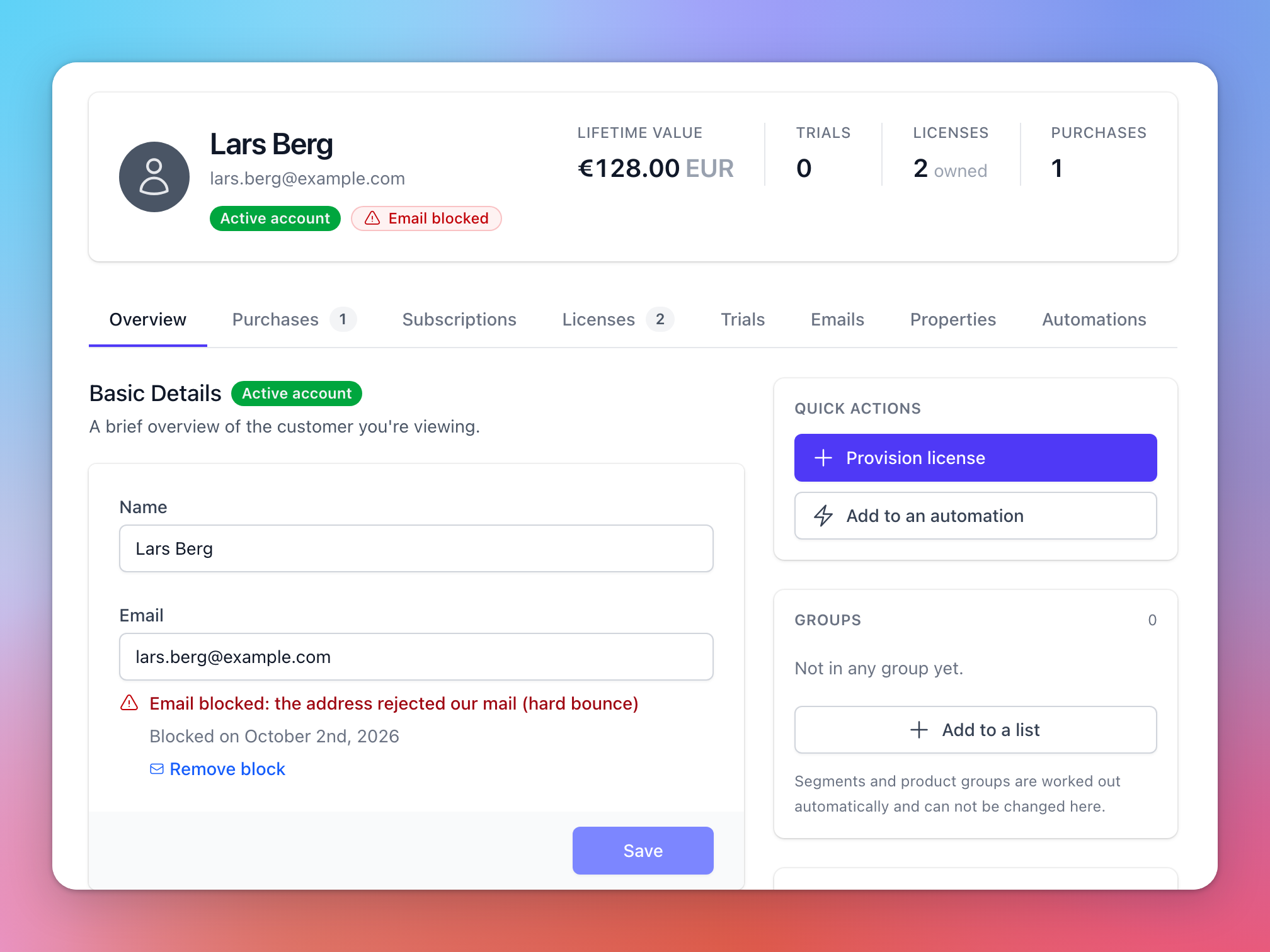
Hard bounce: the address doesn't exist, or the receiving mail server refused it for good.
Repeated delivery failures: five temporary bounces in a row, with nothing delivered in between.
Spam complaint: the customer marked one of your emails as spam.
Once you're confident the address works again, for example because the customer has sorted out their mailbox, click Remove block and Moonbase starts sending to it again. A block from a spam complaint can't be removed in the app, but Moonbase support can help if the customer asks to get your emails again.
The Emails tab on a customer's page lists what they have been sent, and whether each email was delivered, bounced or held back because the address is blocked.
Transactional and marketing emails
Moonbase treats the two kinds of email differently:
Transactional emails, like receipts, licenses, password resets and confirmations, always go out, because your customers need them.
Marketing emails, your campaigns and automations, only go to customers who opted in to their type, newsletter or product updates. If your account asks customers to confirm their email address, they need to have done that too. Every marketing email has an unsubscribe link.
Frequently asked questions
Can I change the text of the receipt, or turn it off?
No. Every customer gets a receipt, and its wording is set by Moonbase. You can make it look like yours with your logo, theme and footer links, and send it from your own domain.
Why are my emails coming from no-reply@moonbase.sh again?
Check under Account settings > Email that your domain still shows Verified, and that you have a sending address with the Transactional purpose. If the domain's DNS records changed, Moonbase falls back to its own address, so that receipts still arrive.
A customer says they never got their receipt.
Look at the Emails tab on their page. If the email bounced or the address is blocked, correct the address or remove the block, then use Resend receipt on the sale. If it was delivered, ask them to check their spam folder. Sending from your own domain helps there too.
Can I get an email when a particular product sells?
The Sale made alert in Email notifications covers every sale and can't be limited to one product. If you need that, a webhook lets your developer react to sales of particular products.
Was this helpful?
Still need help? Ask the team