Account features
Toggle the customer-facing features your account supports; customer portal, sign-up confirmation, phone collection, and a marketing-consent model that matches your jurisdiction.
Written By Tobias Lønnerød Madsen
The account features lets you turn customer-facing flows on or off, and choose how marketing consent is collected. These settings shape what every customer sees during sign-up, checkout, and ongoing account interactions, so changes here apply to your entire customer base.
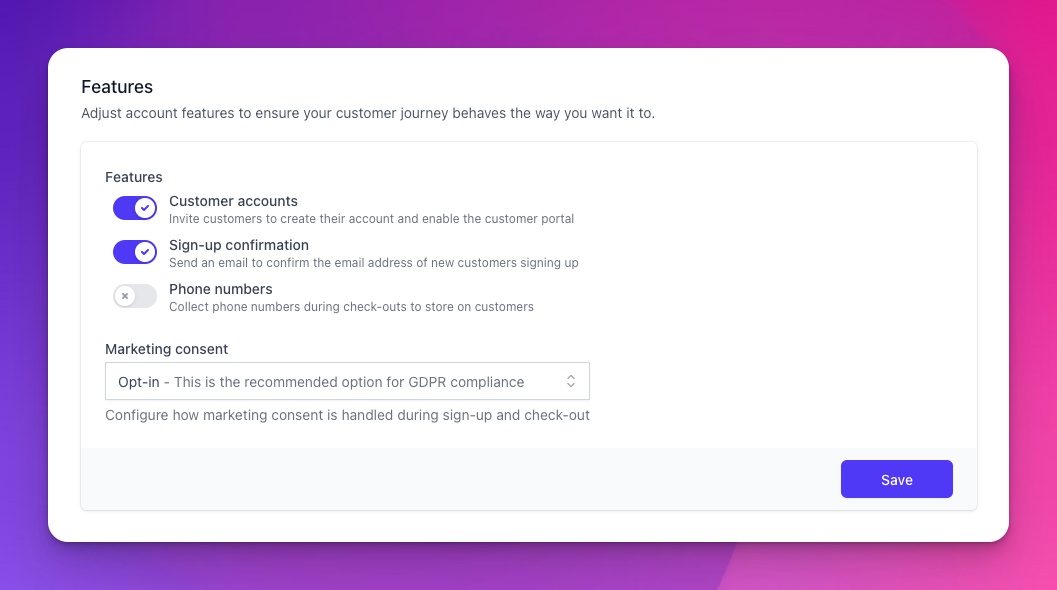
Customer accounts
When enabled, customers are invited to create an account and the customer portal is exposed. Disable it if you don't want any customer-facing accounts (e.g. one-shot purchases with no portal access). Disabling this also means downstream features that rely on a logged-in customer (subscription management, downloads from the portal) won't be available.
Sign-up confirmation
When enabled, new customers receive a confirmation email and must verify their email address before their account is fully active. Recommended for production use, since it increases your data quality. It does not prevent users from using the account without confirming their email address.
Phone numbers
When enabled, checkouts collect a phone number alongside the email address. Useful if you need to contact customers for support or fulfilment. Disabled by default since most products don't need it.
Marketing consent
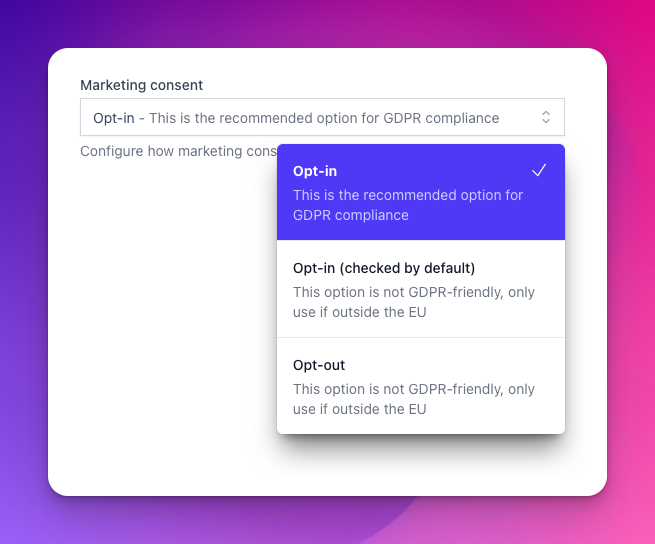
How customers consent (or not) to receiving marketing communications during sign-up and checkout. Pick the model that matches the law where your customers live:
Opt-in — the consent checkbox is unchecked by default; customers must actively check it. Required for GDPR (EU/UK) and the safest default everywhere.
Opt-in (checked by default) — the box is pre-checked. Customers can uncheck it before submitting. Not GDPR-compliant — only use if you sell exclusively outside the EU/UK.
Opt-out — there is no consent box; customers are subscribed automatically and must unsubscribe later. Not GDPR-compliant — only use if you sell exclusively outside the EU/UK.
Frequently Asked Questions
What happens to existing customers if I disable Customer accounts?
What happens to existing customers if I disable Customer accounts?
Already-created accounts remain, but new customers won't be prompted to sign up and the portal becomes unreachable. Re-enable to restore access.
If I switch from Opt-in to Opt-out, what happens to existing customers?
If I switch from Opt-in to Opt-out, what happens to existing customers?
Existing consent records are unchanged, only new sign-ups are affected. Switching jurisdictions later won't retroactively opt anyone in.
Still need help? Ask the team