Buying from a store that uses Moonbase
For buyers: why Moonbase is on your statement, where your products and licenses are, and who to ask about refunds, invoices and support
Written By Tobias Lønnerød Madsen
Lots of software makers sell their products through Moonbase. When you buy from one of these stores, we are the reseller that takes your payment and handles tax, receipts and refunds, while the store that makes the product looks after the product itself. This article explains what that means for you, and who to ask about what.
Why Moonbase is on my statement
At checkout, the payment step says the order is "Sold and fulfilled by Moonbase AS" (or Moonbase LLC for some purchases in the US), "an authorized reseller" of the store's products. That's why the charge on your card or bank statement is under our name, usually together with the store's web address, such as acme-audio.moonbase.sh.
If you don't recognise a charge:
Search your email for a receipt from around the date of the charge. It comes in the store's name and says which products you bought.
Ask anyone else who uses the card, in case they bought something.
Check the name on the statement. Other companies use the name Moonbase too, and a charge from us carries a store's address ending in
moonbase.sh.
Still not sure? Write to support@moonbase.sh with the date and amount of the charge and the last four digits of your card, and we'll look it up. Please contact us before you ask your bank to reverse a charge: a chargeback we haven't agreed to counts as cancelling the order, and the license that came with it may be revoked.
Finding your products and licenses
Everything you've bought is in your account with the store. The email you got with your order links to it. It is at the store's own address, like acme-audio.moonbase.sh, or on the store's website. Sign in with the email address you bought with.
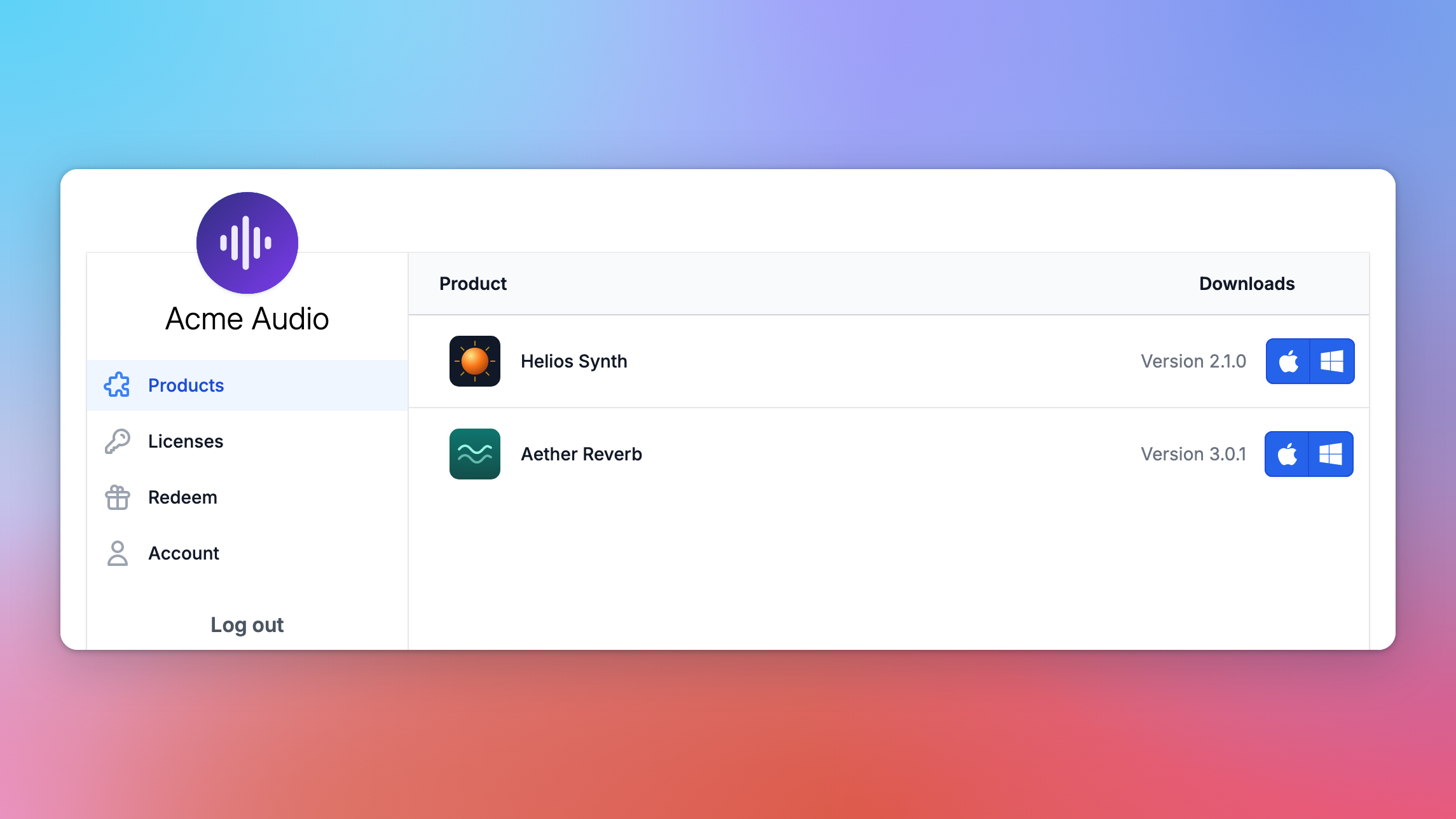
Products has the latest version of everything you own, with a download for each platform.
Licenses lists your licenses, their status and how many devices each is activated on.
Subscriptions, if you have one, is where you cancel or renew it, or change the card it's paid with.
Redeem is for voucher codes the store has given you.
Account holds your name, email address, password and which emails you'd like from the store.
Can't sign in?
If it says the account doesn't have a password yet, we've just emailed you a link to choose one. If it says the user doesn't exist, there's no account with that email address at this store yet, for example because you only signed up for the newsletter: use Sign up with the same address. A password reset link works for 30 minutes, so use the newest one.
Your account belongs to that one store. If you buy from two stores that use Moonbase, you have two separate accounts, even with the same email address.
Moving a license to a new computer
Each license can be activated on a set number of devices. To make room on a new computer, free up an old one first:
Open Licenses in your account with the store.
Click the line under the product that says how many devices are activated, such as "2 of 3 devices activated".
Click Revoke next to the device you no longer use.
Activate the product on your new computer.
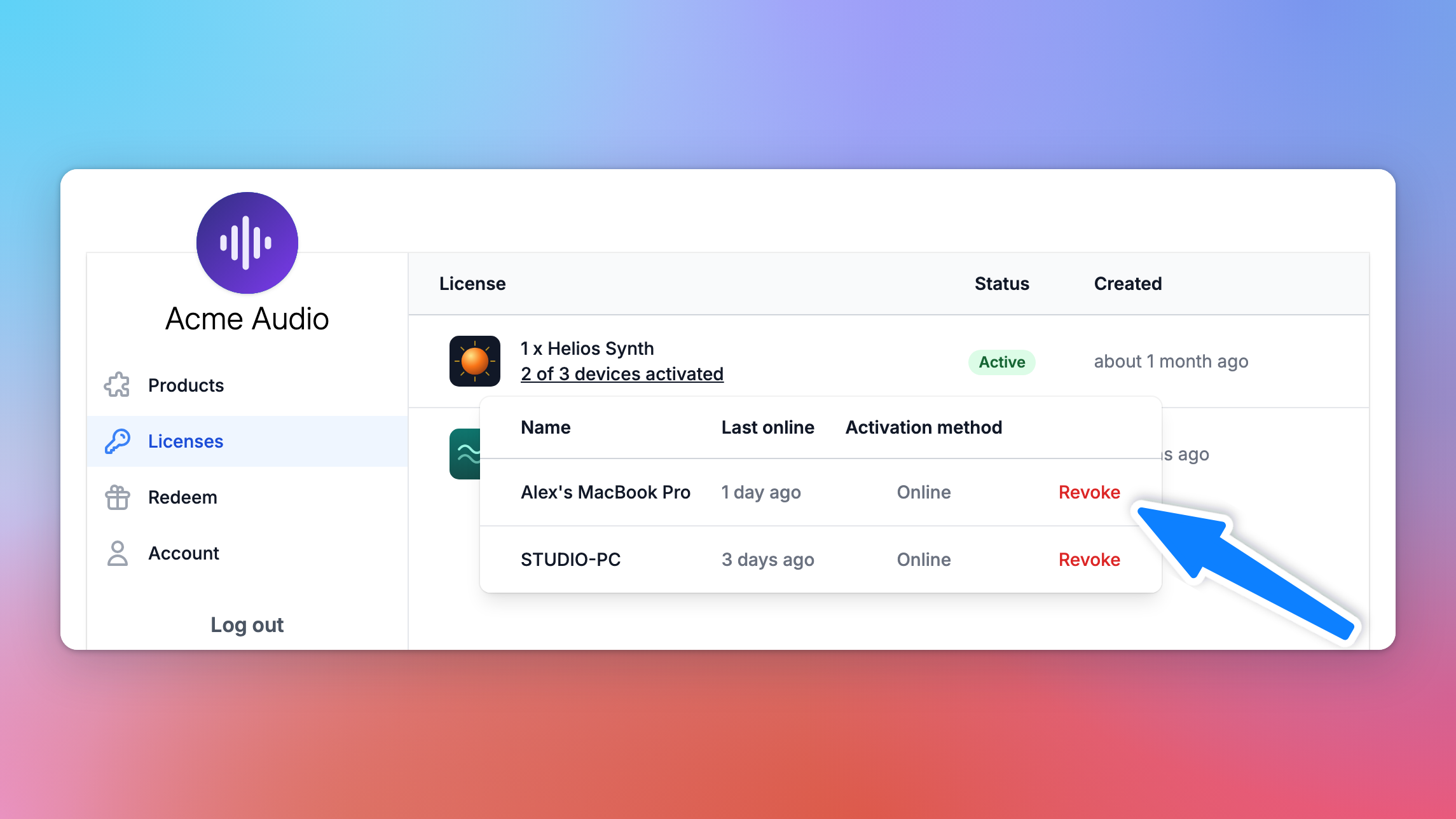
Revoke is only there for devices that were activated online. If you activated a computer offline, with a license file, ask the store to free it up for you.
Refunds and cancelling
Refunds are up to the store, so ask them first, for example by replying to your receipt. If they agree, the money goes back to the payment method you used, usually within a few days.
If you're a consumer in the EU or EEA, you normally have 14 days to withdraw from a purchase. Digital products are delivered straight away, so checkout asks you to tick "I want immediate access and waive my 14-day right of withdrawal" before you pay, and once the product has been delivered, the right to withdraw no longer applies. Your rights if a product doesn't work as it should are not affected. The Terms of Use, linked at the bottom of every store page, have the details.
You can cancel a subscription at any time under Subscriptions. It stops the renewals, and you keep access until the end of the period you've paid for.
Receipts and invoices
Your receipt email has a PDF invoice attached. It names us as the seller and shows what you paid and the tax, so it's the document to give your accountant. There's no order history in your account, so if you've lost the email, ask the store to send it again.
Buying for a business? Choose Business purchase at checkout and add your tax ID. If you forgot, ask the store within 14 days of the purchase: they can add your business details, refund any VAT you shouldn't have paid, and send you a corrected invoice. After that, write to us within 60 days of the purchase with your tax registration number, and we'll see what can be refunded. A processing fee may apply.
Who to contact
The store, for anything about the product: installing and activating it, updates, bugs, your license, and refunds. Emails about your order come in the store's name, and replying to one reaches them.
Moonbase, at support@moonbase.sh, for a charge you don't recognise, a payment problem you can't sort out with the store, withdrawing from a purchase, or an invoice question. Include your order number and the email address you bought with.
Frequently asked questions
I paid, but I didn't get my product.
Check your spam folder for the receipt, then sign in to your account with the store. If the product still isn't there, contact the store with your order number: they can see your order and finish delivering it.
Can I change the email address on my account?
Yes, under Account. We'll ask you to confirm the new address.
How do I delete my account?
Ask the store. They can delete your account and the personal details they hold about you.
How do I stop marketing emails?
Use the unsubscribe link at the bottom of any of them, or untick the newsletter and product updates under Account. Receipts and other emails about your purchases still come.
Was this helpful?
Still need help? Ask the team